

Over 60 percent of American workplaces experience supply shortages that disrupt daily operations. Whether you run a busy legal office or a small marketing agency, managing printer supplies affects productivity and budget control. Taking a smart approach to ordering printer consumables can save both time and unnecessary stress. Here you will find practical, step-by-step guidance to help every American office keep printers running smoothly without last-minute surprises.
| Key Point | Explanation |
|---|---|
| 1. Assess Office Printer Needs | Monitor current printer usage to predict future supply trends and streamline orders effectively. |
| 2. Research Reliable Vendors | Evaluate suppliers based on credibility, pricing, and customer feedback to secure quality products. |
| 3. Choose Compatible Consumables | Use Original Equipment Manufacturer (OEM) products to ensure optimal printer performance and avoid damage. |
| 4. Ensure Secure Online Orders | Verify website security features and keep records for safer transactions when purchasing supplies. |
| 5. Verify Deliveries Thoroughly | Inspect received items against your order to confirm quality, compatibility, and report discrepancies immediately. |
Successfully managing your office printer supplies starts with a strategic assessment of your current and future requirements. Understanding your printing volume and specific needs will help you streamline your ordering process and avoid unexpected inventory shortages.
Begin by gathering key data about your current printer setup. Review your recent printing habits with different HP printer models to determine precise usage patterns. Count the number of printers in your office, noting their specific makes and models. Track your monthly print volume by checking printer logs or reviewing past toner replacement records. Pay attention to which departments print most frequently and what types of documents they typically produce.
One practical tip is creating a simple tracking spreadsheet listing each printer, its model, average monthly pages printed, and current supply levels. This documentation will help you predict future supply needs accurately and prevent last-minute emergency orders. By taking a systematic approach to assessing your printer supply requirements, you will optimize your ordering process and maintain smooth office operations.
Finding trustworthy printer supply vendors requires strategic research and careful evaluation to ensure you receive quality products at competitive prices. Your goal in this step is to identify reliable suppliers that consistently meet your office’s specific printing needs.
Start by conducting comprehensive online research into potential printer supply vendors. Utilize comprehensive business ratings from the Better Business Bureau to assess vendor credibility and customer satisfaction levels. Look for suppliers with established track records, transparent pricing structures, and positive customer reviews. Pay close attention to factors like product availability, shipping times, return policies, and customer support responsiveness.
One practical tip is to create a comparison spreadsheet documenting each potential vendor’s key attributes. Include details such as product range, pricing, minimum order quantities, shipping costs, and customer service contact information. By systematically evaluating multiple vendors, you will be better positioned to select a reliable partner who can consistently meet your office’s printer supply requirements. This careful approach will help you avoid potential issues with product quality, delivery delays, or unexpected pricing complications.
Choosing the right printer consumables is crucial for maintaining optimal printer performance and avoiding potential equipment damage. Your goal is to select supplies that precisely match your office printer’s specifications and operational requirements.
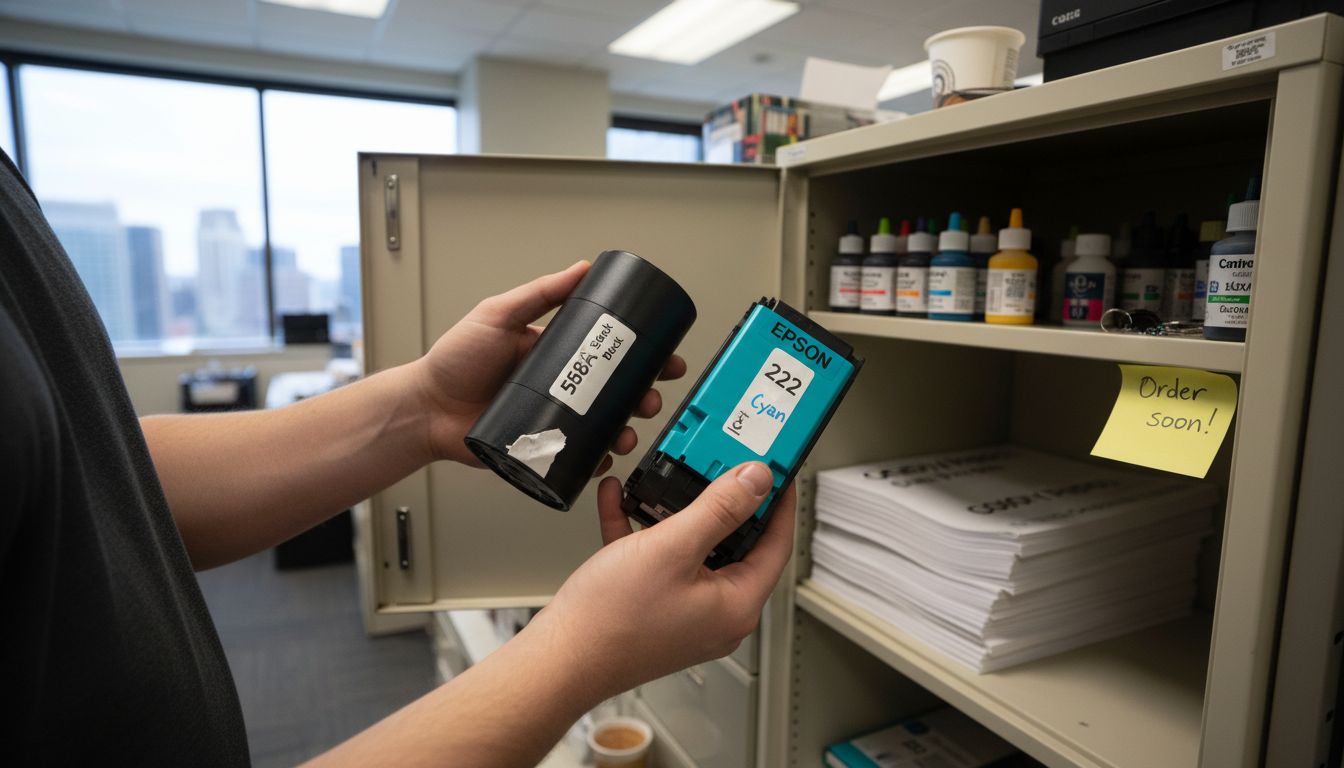
Begin by thoroughly identifying your specific printer model and manufacturer requirements. Recommendations from university technology experts consistently suggest using Original Equipment Manufacturer (OEM) products to ensure maximum compatibility and printer longevity. Carefully review your printer’s manual or online specifications to determine the exact toner cartridge, ink, or consumable type needed. Pay special attention to yield ratings, color specifications, and model numbers to guarantee a perfect match.
One practical strategy is to consolidate your printing infrastructure. As suggested by sustainability experts, consider using multi-function copiers that can help reduce waste and simplify supply management. Create a detailed inventory of your current printer models, their specific consumable requirements, and anticipated monthly print volumes. This approach will help you make informed purchasing decisions, prevent unnecessary supply purchases, and optimize your office’s printing resources.
Purchasing printer supplies online requires careful attention to security and transaction details to protect your financial information and ensure a smooth ordering process. Your primary goal is to complete a secure and efficient online purchase that meets your office supply needs.
Experts recommend carefully evaluating online retailers and their transaction security protocols before finalizing any online purchase. Begin by verifying the website’s security features such as HTTPS encryption, secure payment gateways, and clear privacy policies. Select a payment method that offers fraud protection such as credit cards or secure digital payment platforms. Double check your order details including product specifications, quantity, pricing, and shipping information before submitting your purchase.
One critical tip is to create an account with the vendor if possible, which allows you to track orders, save payment preferences, and maintain a purchase history. This approach provides additional transaction transparency and makes future ordering more streamlined. Always keep your order confirmation and tracking information for reference, and review the vendor’s return and warranty policies to understand your options in case of any product issues.
Successfully ordering printer supplies requires a thorough verification process to ensure you receive exactly what you purchased. Your objective is to carefully inspect the delivered items against your original order and confirm their quality and compatibility.

Immediately upon delivery, conduct a comprehensive inspection of your printer supplies. Energy efficiency experts recommend carefully assessing received supplies to maintain optimal printer performance and prevent potential equipment issues. Start by comparing the delivered items against your order confirmation. Check that the brand, model number, quantity, and specific product specifications match exactly what you originally ordered. Examine the packaging for any signs of damage or tampering, and verify that all items are sealed and undamaged.
One practical strategy is to create a quick checklist for your supply verification. Immediately unpack and count each item, comparing them to your order invoice. Test a sample cartridge or supply item if possible to confirm functionality. Keep all original packaging and documentation until you are completely satisfied with the order. If you notice any discrepancies or quality issues, contact the vendor promptly and document the problem with clear photographs and detailed notes to support your claim.
Ordering printer supplies online can be a challenge when trying to balance compatibility, security, and timely delivery. This guide highlights common hurdles like assessing your exact office needs, selecting the right consumables, and verifying orders to prevent costly downtime. Missing out on these essential steps can lead to wasted time and unexpected expenses.
Take control now by partnering with a trusted supplier that understands your unique office printing demands. At GetToner, we offer a reliable one-stop solution for all your office equipment and printer consumables. Our streamlined ordering process ensures you receive the right products securely and promptly, helping you avoid last-minute shortages and compatibility issues.
Ready to experience hassle-free printer supply management? Visit GetToner to explore our selection and enjoy secure checkout options designed for busy offices. Don’t wait until you run out of critical supplies. Take the first step towards smoother printing operations at GetToner now.
To assess your office’s printer supply needs, gather data on your current printer models, monthly print volume, and the types of documents printed. Create a tracking spreadsheet listing each printer, its average monthly pages printed, and current supply levels to help predict future supply needs.
When researching printer supply vendors, evaluate their credibility by checking customer reviews, shipping times, return policies, and pricing. Create a comparison spreadsheet to document key attributes of potential vendors, which will help you make an informed decision.
To select compatible printer consumables, identify the specific printer model and manufacturer requirements. Review your printer’s manual for the recommended toner or ink type, focusing on yield ratings and model numbers to ensure optimal performance and compatibility.
To secure online orders for printer supplies, verify the website’s security features like HTTPS encryption and a secure payment gateway. Use a payment method that offers fraud protection and double-check your order details before submitting.
To verify the quality of ordered printer supplies, inspect the delivered items immediately against your order confirmation. Check for correct brand and model numbers, and test a sample item if possible to ensure functionality, documenting any discrepancies with photographs.
If your printer supplies order encounters issues, contact the vendor promptly with clear documentation of the problem. Keep the original packaging and any evidence, as this will help resolve the matter quickly and efficiently.